Näytetään tekstit, joissa on tunniste Steam. Näytä kaikki tekstit

lauantai 16. tammikuuta 2016

Hexcells, Hexcells Plus & Hexcells Infinite

Level 6 from Hexcells Plus, in its initial state.
Hexcells is a casual puzzle game in the spirit of the good old Minesweeper. It differs from Minesweeper with a few key points, though: 1) all the puzzles are solvable by logic only, you never need to guess (even if the logic may be a bit tricky to figure out!); 2) the board consists of hexes instead of squares; and 3) there are other kinds of hints besides just the number of "mines" (blue hexes) next to a number hex, such as the number of hexes on a column, or a hint that the blue hexes around a number hex are joint with no gaps (number in curly braces: {2}) or that they are not all adjacent (number with dashes around them: "-3-"). Also the game looks nice and has an ambient background "music" that can only be described as "soothing".

It took me less than two hours to perfect the original Hexcells and I figured I could've played some more, so I bought Hexcells Plus and Hexcells Infinite too. All of the games have initial tutorial levels to teach the mechanics, but the difficulty level in Hexcells Plus goes up way quicker than in Hexcells -- there are few really easy levels. The more difficult levels can even take up to 30 minutes or so, which started to feel like too much, especially given that you cannot save the game in the middle of a level! Also, it does feel irritating if you make a mistake towards the end of a level after having spent 20 minutes on it, especially if you're after the Perfectionist achievement without cheating.

Level 29 from Hexcells, almost solved.
Both Hexcells and Hexcells Plus have 36 levels, but it took me between 5 and 10 times longer to complete Hexcells Plus than Hexcells. All the levels in both games are hand-crafted and sometimes almost made me laugh at the beauty of the puzzle, which is a good sign of a good puzzle game. I'm still in the middle of Hexcells Infinite, which also has 36 hand-crafted levels, but in addition to that, millions of randomly generated levels and a possibility to load in community-made levels.

Playing all the three games is starting to feel a bit laborious, but the games are strangely addicting and you often feel like playing one more level even though the last one already took too much time. I can warmly recommend any of these games to any puzzle-lover out there. I liked the original Hexcells the most, as it offered a short Flow-state of puzzle-solving, whereas the other games make you put much more effort into them. Hexcells is also priced the same as Hexcells Plus, Hexcells Infinite being a bit more expensive. All the games are sold in a bundle too, which you might find at a nice discount in some Steam sale.

lauantai 16. kesäkuuta 2012

Frozen Synapse

Frozen Synapse is a cool game where you control a squad of soldiers by giving them orders and then watching them execute the orders for five seconds at a time. Your opponent does the same, and if you anticipated their moves correctly, you should see your soldiers take down theirs. The orders are given as waypoints and they can be arbitrarily complex, such as "back away from the door keeping your sights towards it, then wait for 0.2 seconds before turning and running across the hallway ignoring any possible enemies in there, and then duck behind the cover while taking a particular enemy to your sights". You can finish a turn in five minutes or you can grind it for an hour.

The game has several different modes and a "Dark" and "Light" variant of each. In the Light versions you always see where the enemies are, whereas in the Dark versions you only see the enemies that are currently in the field of vision of your troops. Once you lose a sight to an enemy in a Dark game a "shadow" of the enemy stays at their last known location along with an info text like "Last seen 2.8 seconds ago".

A maneuver assigned to a machine gunner.
The most popular modes are probably Extermination and Disputed. In Extermination both teams try to exterminate the other, plain and simple. In Disputed, the teams also try to kill each other again, but they also try to hold as much ground as possible in order to extract boxes that appear on the map after the fourth turn. Then there's also a Hostage mode where the other player plays as a hostage taker and the other tries to free the hostages. The hostages need to get to the edges of the playing area and they are controlled by the rescuer, but they can only be given instructions once. The hostage taker then tries to prevent the hostages from getting away.

In all game modes you can simulate the end result of a turn in the planning phase. This means that you can also assign commands to the enemy troops and move them around when you try to anticipate what the enemy will actually do. Simulating is crucial. The game is deterministic, so if in your simulation a soldier gets shot, he will get shot the same way in the actual outcome -- provided that everything stayed the same compared to the simulation. A slightly differently placed unit may yield a completely different result.

Let's watch a game of Dark Disputed I just finished. (Unfortunately the replay doesn't show the actual fields of vision for the troops.) The replay doesn't include the planning phases, just the action, so it lasts only 30 seconds. Remember that there was a planning phase every five seconds. I was controlling the green team and my enemy was controlling the red team. I recommend opening the video in a separate window and watching it with the HD quality:

Initially, both players can see the starting positions of each other's troops. I determine that no contact is likely during the first turn and just make my troops spread around and advance. At the end of the first turn, at 00:05, the enemy sniper at the left sees my machine gunner at the bottom and vice versa. The turn ends there and a subsequent simulation reveals that my gunner has no chance against the enemy sniper, so I order him to proceed, ignoring the sniper. On the other hand I turn the guy with the shotgun around, as sniper rifles have a way longer range than shotguns and at this point it doesn't look like it's going to be a close combat situation.

At 00:06 my sniper at the right gets an enemy gunner to his sights and takes him down a couple of seconds later; that's the first casualty of the game. The turn ends a second later when my gunner and an enemy gunner have just opened fire at each other. The simulation reveals that the bullet that's on its way already is going to kill the enemy, so he cannot dodge it and gets shot right at the beginning of turn three. During turn two my other gunner also ran up across the enemy sniper's line of fire because the simulation revealed that the enemy wouldn't have the time to take the shot. From his new position my gunner also opens fire against an enemy gunner trying to run down across the map at 00:10.

Again when I simulate the situation in the planning phase it appears that the enemy running down may be able to escape from my gunner who just opened a fire against him, so I turn the gunner in the middle to face the doorway in case the enemy would try to flank him. Luckily he takes the enemy down himself at 00:14, so there are only two enemies left now. My gunner at the bottom was ready to greet the enemy had he ran downwards instead of just stupidly staying put in the middle.

At the start of turn three my soldiers had caught a glimpse of an enemy gunner going into the room at the upper left corner. Since shotguns are very powerful at close range I decide to have my shotgunner clean the room and make an elaborate plan on how he would enter the room from the top door. I test my plan with the enemy soldier in every corner of the room until my shotgunner comes across as a winner in every scenario. The machine gunner and the sniper are his backup, and indeed the machine gunner engages in a firefight with the enemy right before the shotgunner enters the room and kills him at 00:19.

At 00:20 the fourth turn ends and the red boxes appear. My sniper is on the other side of the playing area and I decide that the three machine gunners are enough to take the final enemy sniper down, so the sniper goes to collect a couple of boxes. The shotgunner stays at the room he just cleaned and guards the windows in case the enemy sniper would run past them. Finally, it's the machine gunner that's ducked in the bottom room who kills the enemy at 00:23. The replay then plays for one more turn that I didn't actually play and you see my sniper exiting the area with the two boxes he had collected.

So, this hopefully gives you a fairly good picture of the game. Besides the multiplayer mode there's also a single player campaign and a possibility to play quick skirmish matches against the AI, but multiplayer is clearly the most interesting part of this game. The game is cross-platform so Windows, Linux & Mac versions exist. The game can also be bought from Steam, and there's an unofficial Frozen Synapse Wiki for you to use as a reference. Finally, it takes a little patience to really get into the game, but if you intend to play it you should probably also read this blog entry called How Not to Be Shot in Frozen Synapse. :)

tiistai 4. tammikuuta 2011

Open letter to Team17 / Worms: Reloaded review

Dear Team17,

Worms 2 was one of the best games of the late 1990s. I remember playing it countless of hours, designing my own maps and even playing some online games over a dial-up connection. Those were the days!

Now, I recently bought Worms Reloaded from Steam. I figured Worms would be a perfect, simple yet entertaining game to play on my Asus EeePC 1101HA netbook. Well, I was wrong. I couldn't even get past the initial profile creation screen, the game wouldn't work well enough. It probably has to do with the lousy GMA500 graphics chip, but still I would've thought that a game whose looks haven't really changed in 10 years would have worked. Lazy programming? I even tried searching through the game's configuration files to see if the resolution could be changed by editing them, but no luck.

Anyway, I then tried the game on my desktop computer and sure enough, this time it started without a problem. However, the first WTF-moment came right in the beginning: I was asked to create a team but I could only set names for four worms?! Four? As in half-of-the-previous-maximum-of-eight? Seriously? More worms equals more fun, so why on Earth would you reduce the amount of worms per team?

Then I tried playing a game with my newly created team. The main menu already has ten different options but I chose the one where it says "Single Player". Now, a menu of seven items appeared:


Huh? I suppose it's good to have some variety, but what are all these Warzones and Body Counts? There's not even a tooltip explanation for them when you hover your cursor over the menu items. Custom Game sounds like some good, old-fashioned fun so let's choose it and ignore the rest. Now the player is greeted with this screen:


Now, pay attention to this. I think this screen is an exemplary example of what's wrong with Worms: Reloaded. Over the time certain standard user interface widgets, such as drop-down boxes and scroll bars, have been developed and established as good and usable features. This screen, however, tries to reinvent everything. It took me a while to figure out how to add teams into the game. Turns out you need to click the team name between the arrow symbols to move it into the Current Teams box. The next question is "How do I get computer opponents into the game?". There's no view of all the available teams, so you need to scroll for more teams. Turns out computer players have a microchip symbol next to their names, but their difficulty level cannot be determined before adding them into the game. So, two major issues in choosing the team alone: you cannot see all the available teams at once and you cannot see the computer team difficulty levels beforehand. This was certainly done better in the previous Worms games. In an attempt to confirm this I even installed and tried Worms 2 and Worms World Party but unluckily neither one of them would even start on my Windows 7.

The next whatchamacallit on the screen is Game Style. What are these? No information whatsoever is given about them here. To find out more information about them one has to abandon the current setup, go back to the main menu, choose Customise, then Manage Game Styles, and then Edit the game style one wants to know more about. It's a bit of a hidden feature and I was surprised you could actually customize the game this much. There are four different categories of options and the menus look like this:


I find it inconceivable that even on 1920x1200 resolution only seven options are shown at once. Team17, you've got more than 2.3 million pixels at your disposal and you waste it by displaying information that could be easily fit into a thousand pixels?! The only reason I can think of is that this game has originally been designed for consoles and that the players are supposed to be sitting on the other end of the room, but you could do so much more for the PC version! The least you could do would be to scale the menus to show more items at once. Possibly the worst example of menu design is the weapon customization menu:


Really? With 2.3 million pixels you could only fit in information for one single weapon at a time? Have fun customizing all the 47 weapons, let alone comparing the settings of different game styles. I certainly don't want to create new styles or edit the old ones with this user interface, so I'm stuck with the pre-created ones. And by the way, what's with that 47 weapons? Worms World Party had more than 60 weapons! Since when have sequels been made by reducing the available options or by making menus more difficult to use? Talking about weapons, here's the in-game weapon menu:


There are less weapons than probably ever before yet the menu takes up the entire screen, as opposed to just one corner like before! Previously, the weapons were also nicely grouped by purpose: bazooka-type of weapons first, then grenades, then handguns, martial arts, explosives, animals, air strikes, and so on. Now, they are all there in one big mess. The numbers are also horribly off: for example, you cannot easily tell if you have got two or three ninja ropes left in the image shown above.

Now, back to starting the game. We have already seen that the Custom Game menu is counterintuitive and is trying to conceal as much useful information as possible. It does very little to actually allow the player to customize a game. So after setting the teams and clicking Start Game, the game, well, does not start. Instead, you get to choose a landscape. The random landscape generator looks like this:

Looks nice enough but you quickly get frustrated: creating a new landscape takes about two seconds. Forget about Worms 2's instant new random landscape button, the ability to enter a textual random seed for new landscapes and the nice and clear landscape profile view. Now, you'll have to watch an animation of horizontal and vertical scan lines going through the screen and then the random objects are placed around the landscape! The buttons that choose the theme and terrain shape also exhibit the "click to cycle" behaviour known from other menus already, so if you know that you want to play a pirate-themed cavern level you may end up having to click many times and watching the new landscape creation animation equally many times. And all I wanted to do was to play a fun game of Worms! Because of the random landscape generator's repulsive controls you might as well keep playing quick games instead because selecting the landscape is not fun.

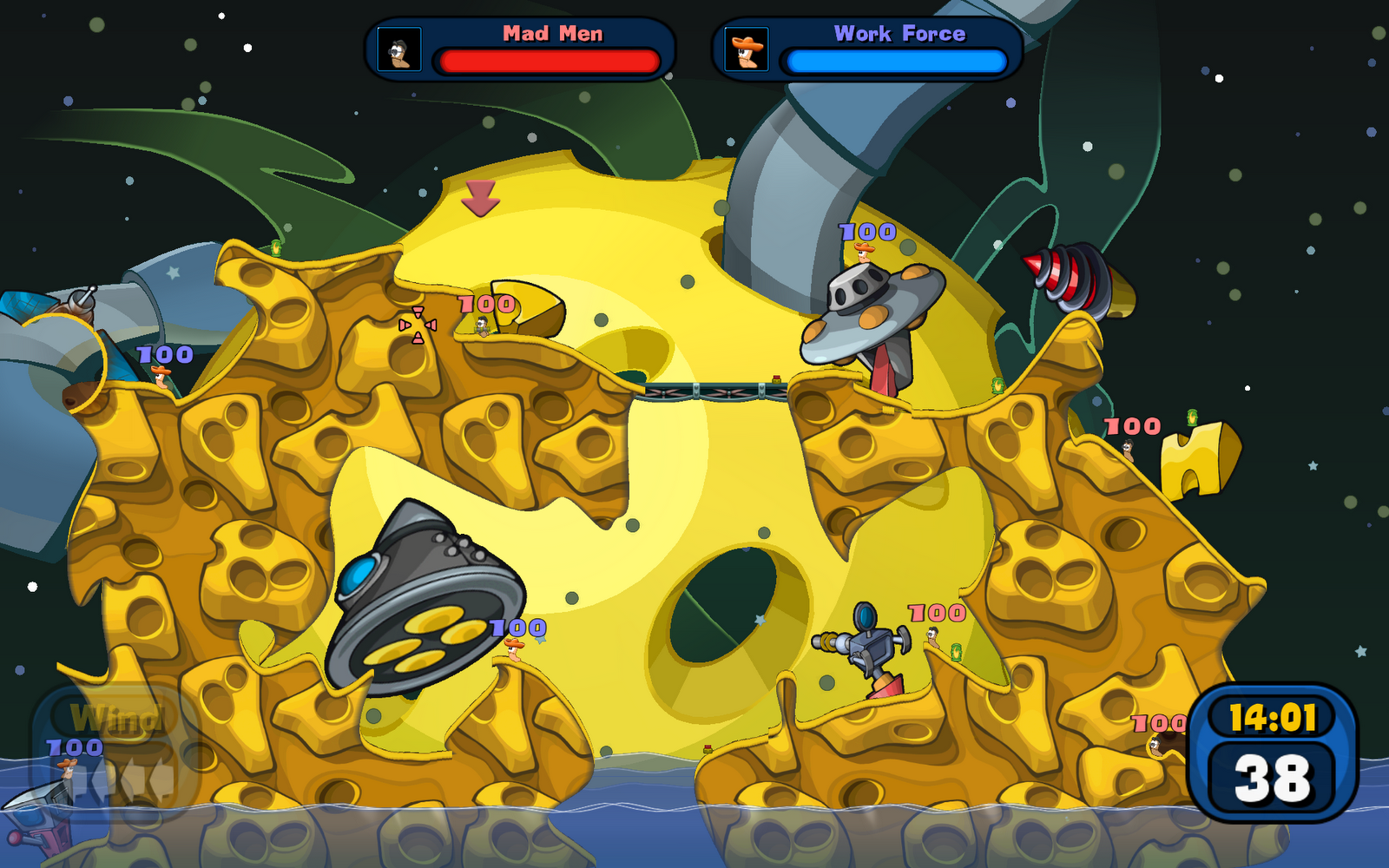
Anyway, after selecting a landscape you finally get into the game (to be plagued by the weapons menu). Here's an in-game screenshot:


Yep, the entire playing area fits into one screen (if you zoom out). It just doesn't feel right: it has never fit into a single screen at once so why cannot it be bigger now as well? It may be just an optical illusion caused by the large resolution in use but still. And look how sparsely the worms are placed! You could certainly have bigger teams as well. Luckily the actual gameplay is still pretty fun.

As a conclusion, I've got mixed feelings about Worms: Reloaded. I really would like to like it and it seems to be the only Worms that works on the current computer systems. However, the counterproductive user interface is taking much of the fun out of the game. Team17, if you've got a UI designer then why don't you listen to that person? Or if you don't have one then hire one quickly! Finally, and I hope this is not the case, if you do have got a user interface designer and that person did design all those crappy menus, please fire them or at least give them a serious warning. Wrapping up, the most serious drawbacks of the game are:

  • user interface tries to conceal as much useful information as possible
  • weapons menu: lacking many weapons, fills up the entire screen and is not organized
  • the maximum size of a team is only 4 worms

In case you decide to publish yet another sequel then I suggest you call it something like Worms: Resurrection and get back to basics instead of coming up with six new single player modes.

tiistai 28. joulukuuta 2010

Trying out some Steam games on the netbook

I have recently tried out a few games on my Asus EeePC 1101HA netbook and will now briefly report the results:

You'd think that Flight Control, which also exists for mobile phones, would run on a netbook, but no. Sure, it's HD, but still. The same actually goes for Worms Reloaded: Worms 2 was released in 1998 and the graphics seem to be essentially the same as back then, but now I couldn't even get past the initial "This is your first time playing the game! Would you like to create a player profile?" screen of the newest incarnation! World of Goo is a happy surprise and runs almost smoothly, even though I'm willing to bet it does more complex calculations all the time than either of the two other games. Goes again to show you that the weak spot of this netbook is its Intel GMA500 graphics chip. Oh well, at least I've got my still brand new'ish desktop computer.

lauantai 25. joulukuuta 2010

The Humble Indie Bundle #2

There's only 13 hours left of this offer so act quickly: The Humble Indie Bundle #2 offers five indie games for whatever price you choose to pay! The games are Braid, Cortex Command, Machinarium, Osmos and Revenge of the Titans and most of them are redeemable on Steam as well. If you pay above what the average user pays (currently 7.80 USD) you'll also get the first Humble Indie Bundle which contains six games, including the hits World of Goo and Gish. World of Goo alone is well worth the 7.80 USD and I have heard good things about Braid, Machinarium and Gish as well. This is the first time I hear about Osmos but it looks interesting too. I already bought the games and might have done that even if I already had all the games as I find the Humble Bundle concept very supportable.

torstai 19. elokuuta 2010

Steam's pricing policy

Steam is an online content delivery system where you can purchase and download games. It also involves some social networking features. Steam offers some indie games that cannot be bought elsewhere, but it also distributes some big titles. In the past I have written about a few games I've downloaded from Steam. 

Lately I have been contemplating pre-purchasing Civilization V which will be out in about five weeks. I might have purchased it already if it wasn't for Steam's ridiculous pricing policy: the exchange rate of 1 USD = 1 Euro! The basic version of Civ 5 costs $49.99 for US-based customers but 49.99 € for EU-based customers! The current real exchange rate is something completely different and the correct price in Euro would be 38.98 €. With the Civilization V Deluxe Edition the situation is slightly fairer: shopping from the US the price is $59.99 (46.77 €) but for European customers it's not 59.99 € but 54.99 €, which of course still leaves a difference of 8.22 € ($10.54)...

I was able to check the US prices using some proxy servers located in US. Basically my browser connects to a proxy server and asks for a web page, after which the proxy fetches the page and returns it to my browser. The target site (Steam) deduces the country of origin for each request and chooses the prices accordingly. When the proxy server is located in the US it looks like the requests are coming from US and Steam shows the prices in dollars even though it's me requesting the sites from Europe.

Anyway, while I was at it I decided to check the prices for the United Kingdom as well. Turns out Civ 5 is in discount at the moment: the regular version costs £29.99 ($46.78 or 36.49 €) and the Deluxe Edition £39.99 ($62.36 or 48.68 €). Still slightly more expensive than the prices in US. However, these were just the discount prices -- the normal prices are £39.99 and a whopping £49.99 ($77.97 or 60.82 €) respectively!

Alas, while writing this post I just found out I've been doing it all the hard way: you don't need to use a proxy to get the prices from different regions, just install this script to your browser! At least the US prices seem to be displayed correctly. However, for UK it only displays "N/A". For Australia it displays the prices 79.99 USD and 89.95 USD but I wasn't able to confirm those using a proxy. If the prices are correct, however, it's an enormous difference from the US price! I wonder how Steam can just keep doing this? There's even a Steam Community group called 1€ ≠ 1$ with more than twenty thousand members.

sunnuntai 31. tammikuuta 2010

The Secret of Monkey Island: Special Edition

In my review of the Asus EeePC 1101HA I noted that it had a pretty lousy Windows Experience Index score at the gaming graphics section. This, of course, does not stop me from trying out some games anyway.

First on the line was The Secret of Monkey Island: Special Edition which I had bought from Steam but which refused to work on my desktop computer because of the Athlon XP 3000+ processor. That's actually the first game I have ever run into to mean business with the system requirements, "Intel Pentium 4 3GHz or AMD Athlon 64 3000+". Odd, since it's just a point and click adventure, but anyway.

So, the Special Edition is a remake of the original game that was published in 1990. The game features one Guybrush Threepwood, a young wannabe pirate, trying to become a real pirate. The remake contains exactly the same plot and everything as the original game, but all the lines are spoken out loud and the graphics have been modernized. You can, in fact, toggle between the old and new graphics on the fly with a single key press. This feature does come in handy when playing with the netbook, because while it can run the game well in many of the scenes, it becomes unplayable if there are any fire of water shown on the screen. The game is well worth the money anyway and should give you some good laughs. :)