Näytetään tekstit, joissa on tunniste Opera. Näytä kaikki tekstit

sunnuntai 23. toukokuuta 2010

Custom style sheet for xkcd

In February I wrote about custom style sheets. Basically they allow you to modify any web site's visual appearance to your liking. So here is a custom style sheet file for the xkcd web comic for you to download. Here are the deployment instructions for Opera again:

  1. Direct Opera to xkcd.com
  2. Hit F12
  3. Select Edit Site Preferences...
  4. Choose the Display tab
  5. Into the My style sheet box, select the CSS file you hopefully just downloaded
  6. Hit OK, then refresh xkcd.com.

Here is a screenshot of an xkcd comic before the custom style sheet:


And here's a picture after installing the custom style sheet. Notice how the comic now fully fits into the first screenful:

The top bar has been moved below the comic and the title-text of the image has been rendered visible. Some elements have also been made transparent so that they are less distracting.

maanantai 15. maaliskuuta 2010

Opera 10.51 RC1

A month ago I wrote about Opera 10.50 beta. Now the 10.50 has already passed the beta stage and what's more, Opera 10.51 Release Candidate 1 for Windows has just been released. This version contains performance improvements and an even better JavaScript engine, especially what comes to memory management. These features are of course very welcome to all netbook users. :)

torstai 11. helmikuuta 2010

Opera 10.50 beta

Opera Software just released a new version of Opera browser, 10.50 beta. It seems that they have borrowed some ideas from Google Chrome. The user interface is more minimalistic than ever, providing more space for the actual web pages. Individual tabs or windows can be made "private", i.e. Opera forgets everything that has happened in them after they are closed. The JavaScript engine is claimed to be significantly faster than before, and it just looks nice on Windows 7. :)

Custom style sheets

About a week ago I made a post about browsers, namely alternatives to Internet Explorer, and I recommended Opera. I also promised some tips on how to get more out of it, so here goes.

In a netbook the screen space is usually quite limited. However, many sites are designed with larger screen resolutions in mind and may have, for example, excessive margins or too large navigation menus. You may not even have thought about it before, but wouldn't it be quite nice to customize the layout of some sites a bit? With most browsers, including Opera, this is actually possible. You will need to know some hypertext markup language (HTML) and cascading style sheets (CSS) but that's pretty much all it takes. If you use style sheets created by other people then you don't even have to know those.

Anyway. Take geocaching.com. The individual cache pages actually have a lot of clutter: buttons, linebreaks, information that is just not used. Here's a screenshot of a cache page as they typically look like: 
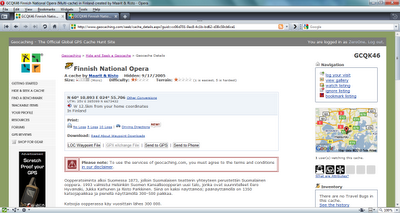

You'll notice that there is so much extra information that the actual cache description barely even starts on the first screenful. Using a custom style sheet you can strip the unwanted elements out of the page:
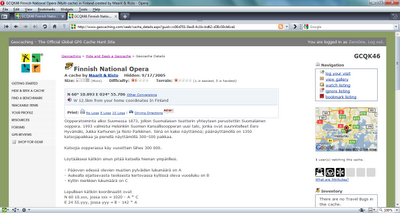


How many differences can you spot and which version of the page would you rather use? To achive this result I used this style sheet. You may copy it and save it anywhere in your computer. How to take this file into use then? Here are the instructions for Opera:

  1. Direct Opera to www.geocaching.com
  2. Hit F12
  3. Select Edit Site Preferences...
  4. Choose the Display tab
  5. Into the My style sheet box, select the CSS file you hopefully just downloaded
  6. Hit OK, then refresh geocaching.com

Presto! Your geocaching.com browsing experience has vastly improved. :)

keskiviikko 3. helmikuuta 2010

Browsers

I have been using the Opera browser for ten years or so and still find it to be the best there is. Opera has had all the best features, such as mouse gestures and tabbed browsing, long before Firefox or Internet Explorer. What's more, they are built in so you don't even need to download dozens of plugins to make it usable in the first place. I'm also using Opera Mini in my cellphone.

That being said, I think Firefox is a great browser too. I couldn't, for example, do any web development without the Firebug plugin anymore. Adblock Plus is an absolutely crucial plugin for any Firefox user as it blocks the ads -- netbooks usually don't have screen space to waste, nor do they like heavy, flashy web pages.

Chrome is a fast and light weight browser by Google. It, too, supports plugins. There's a post at the Google Chrome Blog that walks you through with those. Chrome has got a highly optimized JavaScript engine so those modern web applications such as Google Docs should be pretty fast with it.

So, my point? There are alternatives to Internet Explorer, and as a netbook owner you should definitely try them out and see if they perform better than IE. Lifehacker's blog post from a couple of months ago compares the browsers. In the end, IE gets the lowest score of them all. They were the first to admit that the measurements are not very scientific or too accurate but I do think their results bear at least some significance.

If I were you I would now start using Opera because a) it is, in my opinion, the best and b) because I will post some Opera tips later.